Google นำทาง: นำทางการค้นหา Google ด้วยปุ่มลัด
Google Navigation is a free Chrome add-on developed by veringsek. This add-on allows users to navigate through Google Search using a set of customizable hotkeys. With Google Navigation, users can easily access search results, navigate between pages, and access additional features like the Wikipedia widget and the translator or calculator widget.
ทางเลือกที่แนะนำมากที่สุด

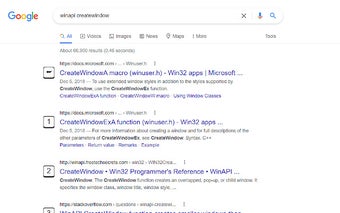
To access general search results, users can use the number keys 0 to 9. The first search result will be selected by default and can be opened by pressing the Enter key. Pressing the period (.) key will take users to the next page of search results, while the comma (,) key will take them to the previous page.
Google Navigation also provides convenient shortcuts for accessing specific widgets. Pressing the letter P will focus on the Wikipedia widget if available, allowing users to quickly access additional information. Pressing the letter T will focus on either the translator widget or the calculator widget, depending on the user's preference.
Additionally, Google Navigation offers a useful feature for power users. When the CTRL key is pressed, an icon will appear to indicate that the "open in new tab" mode is activated. In this mode, all links clicked will be opened in a new tab until the CTRL key is pressed again to deactivate the mode.
Google Navigation is a handy tool for users who want to navigate Google Search more efficiently. With its customizable hotkeys and additional features, it provides a seamless browsing experience for Chrome users.